
Subscription Renewal
Renewing your Trackimo, Myloc8, Petloc8, or Tracki subscription is quick and easy. To purchase a subscription renewal coupon, please contact our Subscription Renewal Department at 1-437-929-2020. We accept all major credit cards as well as Interac e-Transfer payments. Our team will assist you in selecting the appropriate renewal plan for your device and provide the information needed to activate your subscription. You can also reach our customer service team through Live Chat on Trackimo.ca or by email at info@trackimo.ca for renewal assistance or any subscription-related questions.
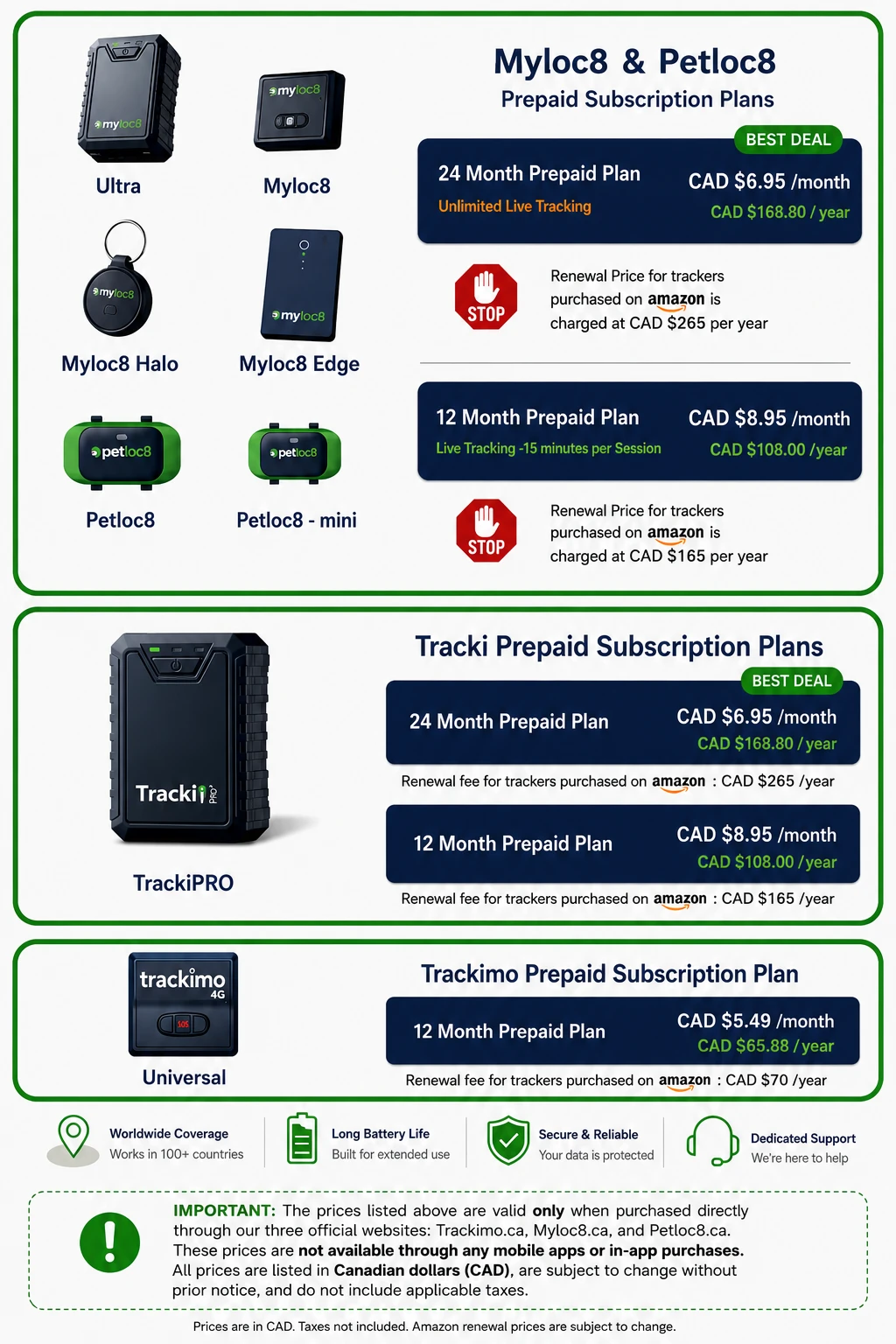
Renew Your Subscription
1. Choose Your Plan
Select a one-year or two-year subscription plan.
2. Complete Your Purchase
A customer service representative will be happy to securely process your credit card payment over the phone. Interac e-Transfer is also accepted.
3. Receive Your Renewal Code
Your subscription renewal code will be sent by email or provided by a customer service representative.
4. Enter the Code in the App
Enter the code in your app, and your subscription will be renewed automatically.
Reach our customer service team through Live Chat on Trackimo.ca or by email at info@trackimo.ca for renewal assistance or any subscription-related questions.
HOW TO ADD SUBSCRIPTION COUPON TO YOUR EXISTING ACCOUNT:
Myloc8
In the Myloc8 app, you can apply a coupon code to extend an existing account/subscription. The coupon option is available both during device activation and from the subscription section. For a device already in your account:
- Open the Myloc8 app and log in.
- Go to Account.
- Find Subscription and tap the arrow next to Subscription.
- Select the tracker/subscription you want to extend.
- Proceed to the renewal/subscription screen.
- Look for “Click here” under the coupon-code option.
- Enter the coupon code.
- Apply it and follow the prompts to complete the subscription activation.
How to Extend Your TrackiPro Subscription Using a Coupon Code
TrackiPro
If your TrackiPro is already activated and you have purchased or received a subscription renewal coupon, you can apply the coupon to extend the service on your existing device.
- Open the Tracki GPS app and log in to your existing account.
- Tap Account.
- Select Subscriptions. This section displays the subscriptions associated with the devices in your account.
- Select the TrackiPro device for which you want to extend the subscription.
- Tap Add Renewal.
On the subscription renewal screen, look for: “Have a coupon code? Click here”
- Tap “Click here.”
- Enter the subscription coupon code provided to you.
- Tap Apply and follow the on-screen instructions to complete the renewal.
- Once successfully applied, the subscription period associated with the coupon will be added to your TrackiPro service.